
CloudEngine S6700 Series Switches Naming Conventions & Description
Publish Time: 14 Feb, 2025
S6700 series switches naming conventions
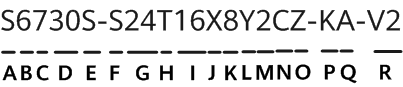

The device name in this figure is used as an example and does not represent a specific device.
The uplink and downlink ports mentioned in this document refer to the recommended usage of the ports, and do not indicate that the corresponding ports can be used only for the downlink or uplink.
S6700 switch naming convention description
| Identifier | Description |
|---|---|
| A | Product type (1 character)The value is fixed at S, indicating that the device is an S series switch. |
| B | Role on the network (1 character)6: aggregation switch5: high-end access switch3: mid-range access switch |
| C | Market positioning (1 character)7: Enterprise series switch |
| D | Product sub-series (2 characters)The left character indicates the generation, for example, S6720 and S6730. The right character distinguishes different products of the same generation. |
| E | Industry identifier (0, 1, or 2 characters)By default, this field is left empty.S: channel distribution model |
| F | Level type (1 character)H: high-levelS: standard |
| G | Number of downlink ports of type 1 (1 or 2 characters)NOTE:For the S6780-H4Z, there is no fixed service port on the device panel. This field indicates the number of pluggable cards supported. |
| H | Downlink port of type 1 (1 character)T: GE electrical portP: GE electrical port, supporting PoE+X: 10GE optical portFX: CFP2 hyper-converged portY: 25GE optical portC: 100GE optical port |
| I | Number of downlink ports of type 2 (0, 1, or 2 characters) |
| J | Downlink port of type 2 (0 or 1 character)T: GE electrical portP: GE electrical port, supporting PoE+X: 10GE optical portY: 25GE optical port |
| K | Number of uplink ports of type 1 (0 or 1 character) |
| L | Uplink port of type 1 (0 or 1 character)S: GE optical portX: 10GE optical portC: 100GE optical portQ: 40GE optical portY: 25GE optical port |
| M | Number of uplink ports of type 2 (0 or 1 character) |
| N | Uplink port of type 2 (0 or 1 character)S: GE optical portX: 10GE optical portC: 100GE optical portQ: 40GE optical portY: 25GE optical port |
| O | Support for pluggable cards (0 or 1 character)Empty: The switch does not support pluggable cards.Z: The switch supports pluggable cards. |
| P | Special function type (0 or 1 character)Empty: By default, this field is left empty.T: The switch supports hardware trust module (HTM). |
| Q | Power module type (0, 1, or 2 characters)Empty: The switch uses pluggable power modules.A: The switch is sold with an AC power module.D: The switch is sold with a DC power module. |
| R | Version type (0, 1, or 2 characters)Empty: By default, this field is left empty.V2: differentiates the models that are of the same series but use different software platforms. For example, the S6732-H and S6732-H-V2 use different software platforms.TV2: The TV2 models use the same software platform as the V2 models and support hardware trust module (HTM). |
Huawei All Series Switches New and Used
For Cisco product list and quote, please visit: https://www.hi-network.com/categories/cisco or contact us at www.hi-network.com (Email: [email protected])